Cat Battles Controls and Survival Guide
Learn Click, Right Click, F, Shift and Q, follow the grab-and-lift tutorial, and improve your position before chasing a ring-out.
On PC: Click punches, Right Click grabs, F kicks, Shift lifts and Q uses the equipped ability. Learn the current tutorial's grab, lift and edge-release sequence, keep the boundary in view, and make survival the first goal before chasing repeated ring-outs.
View reference image
On this page
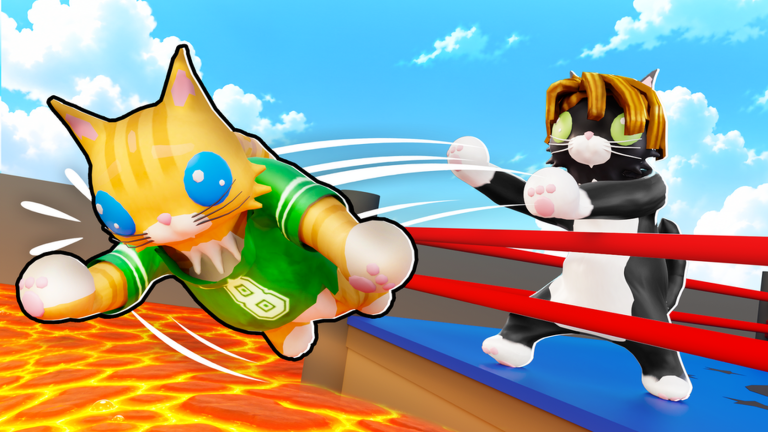
Cat Battles by Cute Malt Games is a Roblox ring brawler. The official description gives the objective as pushing, slapping and tossing rival cats out of the ring, with the last cat standing winning. On PC it lists Click for Punch, Right Click for Grab, F for Kick, Shift for Lift and Q for the equipped ability.
Use those inputs to learn one controlled interaction before chasing a win. CHALLS’ 17 October recording, reviewed on 18 October 2026, shows a tutorial progressing through punching, lifting and moving to the edge to release a held opponent. The practice advice below builds on that visible sequence. It does not claim measured attack damage, guaranteed throws or a universal win combo.
Recognize the correct game and the PC actions
Open the official link and confirm Cute Malt Games as the developer. Cat Battles is also a phrase used by other games and videos, so a familiar title alone is not enough to identify the control scheme.
Read the current on-screen prompts before the round begins. The developer’s PC mapping is straightforward, but those keys do not prove the touch or gamepad layout. If you use another input device, follow its current displayed controls rather than trying to translate a keyboard action into an assumed button.
Practice finding the keys without looking away from the ring. Punch and Grab use different mouse inputs, while Kick, Lift and Ability use separate keys. Accidentally pressing Q when you meant F changes the action you are trying to learn. Keep the first attempts deliberate enough that you can identify what actually happened.
The recorded interface places the equipped Dash ability at the lower right. That is an example of the current recording’s ability display, not proof that every account or later version starts with the same equipment. Read the name shown in your own session.
Learn the grab-and-lift sequence from the tutorial
In CHALLS’ footage, the tutorial first encourages punching, then shows a Shift prompt to lift an opponent. A later prompt tells the player to walk to the edge and release to throw. Those are useful checkpoints: contact, a secured opponent, a lift, and a deliberate release near the boundary.
Begin by recognizing the difference between trying to grab and actually controlling another cat. A missed grab is not the same state as a successful hold. If you immediately press the rest of a memorized sequence, you may act as though you have an opponent when you do not.
Once you can recognize the held state, practice the lift input shown by the current interface. Then look at your own position before moving. The edge is both the place you are trying to send an opponent and a place where your own mistake can end the bout.
The recorded tutorial describes releasing near the edge; we have not verified an identical release binding for every device. Use the current tutorial’s wording. Do not add an invented throw key simply because it would make a neat combo table.
Make your own position the first survival check
Before committing to a close exchange, ask where the boundary is relative to you. You are trying to stay in while the rival goes out. Running toward a target without that check can make a successful first action difficult to finish safely.
For an early bout, prefer enough open floor to see the other cats and your intended movement. This is a positioning recommendation, not a rule that the centre is always safe. Another player can approach from behind, and the actual arena shape in your round can affect the available space.
If you find yourself between an opponent and the drop, work toward a more readable position before chasing another action. Do not treat the ability key as an automatic rescue. The effect depends on the skill actually equipped, and the official listing does not document every activation condition.
In the reviewed footage, multiple cats gather around one target. That is a reminder to watch more than the opponent you first approached. A clean route to the edge can become crowded before you finish moving there.
Choose a small job for each bout
A beginner bout can have a narrower goal than winning. You might aim to recognize a successful grab, complete the lift step, or avoid moving toward the boundary while the camera is pointed elsewhere. Choose one of those for a short block of play.
If your goal is the grab sequence, stop evaluating every attempt by the number of coins or the final result. Ask whether you identified the hold correctly and moved deliberately. If your goal is survival, notice what pulled you into the dangerous position before the ring-out.
Keep the same equipped ability while you learn the basic actions. Changing the skill after each loss adds another explanation for the outcome. Once the controls are familiar, the ability roster and Q guide helps you connect ability use to a specific situation.
A useful note after a bout is concrete: “I started lifting but walked toward the wrong edge,” or “I watched one target and missed the approaching cat.” Either gives the next round a purpose. “The game is random” does not identify the decision you can change.
Understand the available mode names
The developer lists Classic, 2 Teams and 4 Teams. That confirms the mode labels, but the description does not publish every scoring, friendly-fire, respawn or tiebreak condition. Read the current round’s instructions before assuming it uses the same conditions as the previous one.
In a team mode, keep track of the displayed team identification before choosing a target. Agree with friends on simple calls such as “help at this edge” rather than everyone chasing the same rival across the floor. We have not verified a guaranteed teammate rescue interaction, so do not plan around one without checking it in the current game.
The creator recording includes different arena settings and visible objective text. That is another reason to look at the current round rather than treating one boxing-ring clip as a complete map guide. Carry the control knowledge between rounds, then read the objective and space available in the arena you actually receive.
Recover from the mistake you can explain
If an attempted action does not work, check the current state first. Was the rival close enough? Did a hold actually begin? Were you already being moved or falling? Those questions are more useful than immediately blaming the input, and they do not require an unsupported numeric range.
If you are repeatedly thrown out while pursuing someone, shorten the chase and look at the boundary before beginning another grab. If you cannot tell which action fired, slow the input sequence down. If an ability behaves differently from your expectation, check the equipped name and current prompt.
Coins are earned every bout and crates contain furs, sumo gear and emotes according to the official listing. The coins and furs guide keeps that collection loop separate from the control lesson. A new appearance or another crate does not explain why a grab missed, and the sources reviewed here do not establish that collection rarity changes combat performance.
End the first session with a sequence you can recognize: read the round, locate the boundary, perform one deliberate action and see what state follows. Once that is comfortable, add the next step. Clear control makes the chaos easier to learn from, even before you win consistently.
Step-by-step guide
- Confirm the current input prompts
Read the official PC actions and your current device's own prompts before attempting a sequence.
- Follow the grab and lift checkpoints
Recognize contact and a secured opponent before lifting or moving toward the boundary.
- Keep the boundary and other cats visible
Choose a readable position and a small learning goal rather than chasing every target to the edge.
Quick reference
Official PC controls
Read your current device prompts for touch or gamepad; no mapping is inferred from keyboard footage.
| Action | PC input |
|---|---|
| Punch | Click |
| Grab | Right Click |
| Kick | F |
| Lift | Shift |
| Equipped ability | Q |
Video evidence
Watch creator walkthroughs alongside this guide. Check the recording date before following requirements that may have changed.
Cat Battles GUIDE! (Codes, Best Abilities, How To WIN, Tips & Tricks) ROBLOX
Creator footage shows the ring, current action prompts and equipped ability. It supports observed actions, not unmeasured win rates or crate odds.
CAT BATTLES ROBLOX GAME
Creator footage shows the ring, current action prompts and equipped ability. It supports observed actions, not unmeasured win rates or crate odds.
FAQ
Which version does this guide describe?
The official listing and dated creator footage were checked on 18 October 2026. No public build number was available. Follow your current in-game prompts when an update changes the interface.
Are the recommendations based on a personal playtest?
The facts come from the linked developer description and named creator footage. The route and practice suggestions are original editorial advice; no personal live playtest or paid purchase is claimed.
Sources
Recheck these links whenever the game version, release status, or strategy changes.
- Cat Battles — official Roblox listing Developer description and exact game identity checked 18 October 2026.
- CHALLS — Cat Battles GUIDE! (Codes, Best Abilities, How To WIN, Tips & Tricks) ROBLOX Published 2026-10-17. Creator footage, distinct from developer documentation.
- @Baahu — CAT BATTLES ROBLOX GAME Published 2026-10-17. Creator footage, distinct from developer documentation.